 how to center image html
how to center image html
how to center image html
BECAUSE YOU ARE DOWNLOADING A FILE FROM A RANDOM URL THAT YOU DONT CONTROL ITS POSSIBLE TAHT A MALICOUS ACTOR COULD CHANGE WHAT IS BEING SERVED AT THAT URL TO SOMETHING SCARY OR DANGEROUS. RUNNING THIS SCRIPT IS PROBABLY NOT A SUPER SECURITY CONSCIOUS THING TO DO. BUT IM NOT SURE.
You could go through dawatcher.tumblr.com/archive and choose one - copy the 6 digit code in the post tag
Go to the website http://www.insecam.org/en/view/466158/ you can paste in the 6 digits you like into the url
Right click on the preview and go open image in new tab
Copy the URL of the new tab and see if you can strip out some of the parameters for a nice short url
Note it doesn't seem to work for every camera so you might need to fiddle around depending on the model or if its slow
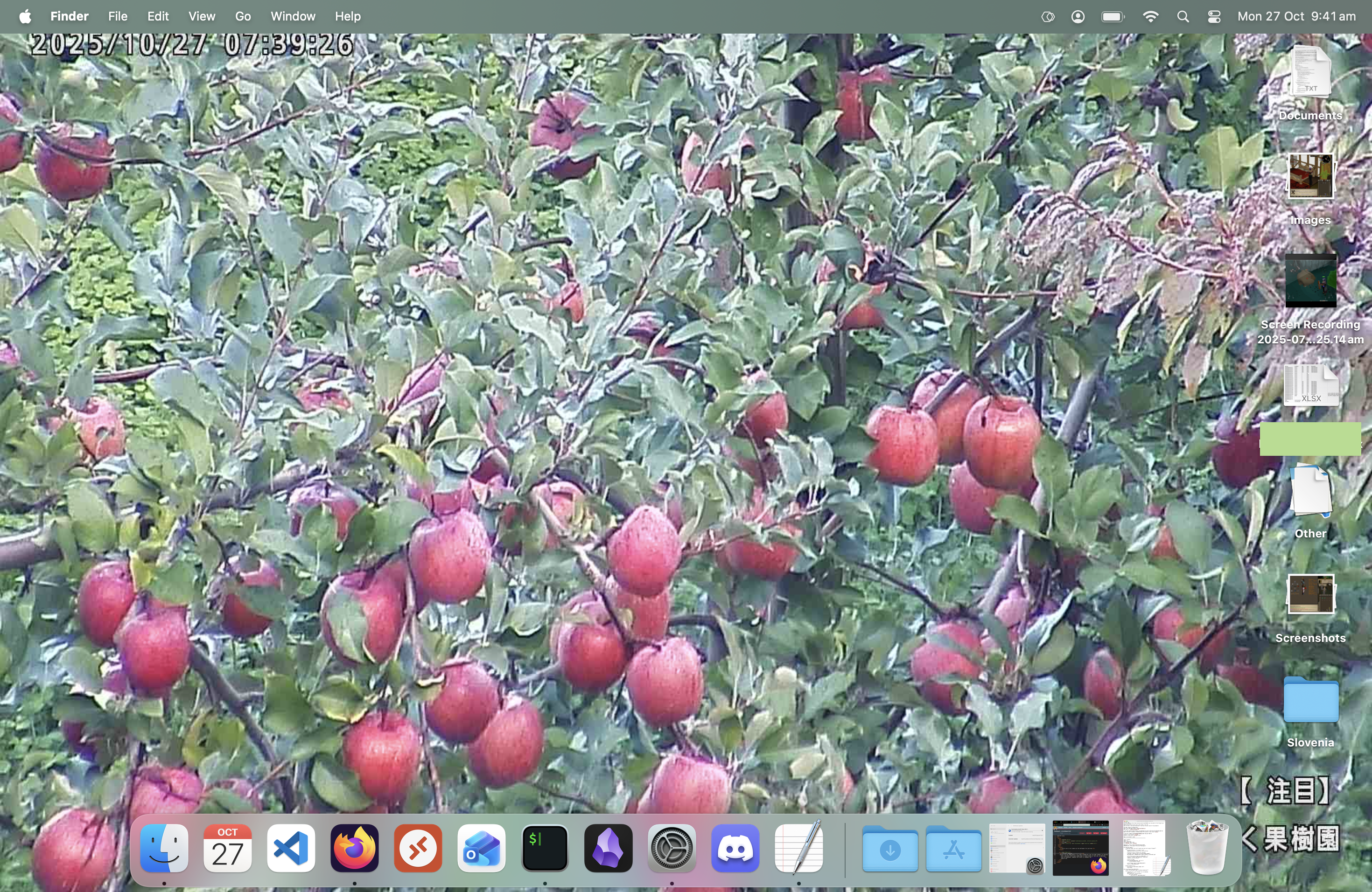
We need a python script to download the currnet frame of the cctv camera and save it locally on the computer. basically its going to save the contents of the webpage (ie the current frame of the cctv camera) to your computer with a UNIQUE filename and then its going to use a scripting langugae called applescript to tell your computer to set its wallpaper to your nice new file and then on subsequent runs it will delete any previous images it had created so you only have one image stored on your computer at the end. you need to save them with unique filenames instead of just overwriting the same file because the computer wont ujpdate the wallpaper if it has the same name bc it thinks the file hasnt changed
SAVE IT IN YOUR HOME FOLDER ~/update_wallpaper.py
RUN chmod +x ~/update_wallpaper.py in da console
IF YOU ARE USING THE BASE INSTALL OF PYTHON AND ITS NOT IN YOUR PATH OR WHATEVER AND YOU NEED TO USE PIP TO INSTALL A MISSING MODULE TRY python3 -m pip install whatevr
IF YOU GET A ERROR LIKE NOTOPENSSLWARNING ABOUT URLLIB3 THEN GO
python3 -m pip uninstall urllib3
python3 -m pip install urllib3==1.26.6
HERE IS THE SCRIPT I HAVE
import requests
import os
import subprocess
from pathlib import Path
from datetime import datetime
from PIL import Image

IMAGE_URL = "http://210.136.200.86/SnapshotJPEG"
DOWNLOAD_DIR = Path.home()/"Pictures"/"Wallpapers"
TARGET_WIFI_SSID = "MYWIFINAME CHANGE THIS"

def is_on_target_wifi():
    """Check if connected to the target WiFi network"""
    try:
        result = subprocess.run(
            "networksetup -listpreferredwirelessnetworks en0 | sed -n '2 p' | tr -d '\t'",
            shell=True,
            capture_output=True,
            text=True
        )

        if result.returncode == 0:
            current_ssid = result.stdout.strip()
            if current_ssid:
                return current_ssid == TARGET_WIFI_SSID

        return False

    except Exception as e:
        print(f"Error checking WiFi: {e}")
        return False

def download_image():
    """Download image from the IP camera and save with unique filename.
    Only runs if connected to target WiFi"""
    #Check WiFi first
    if not is_on_target_wifi():
        print("Not connected to target WiFi network. Skipping wallpaper update.")
        return None

    try:
        # Create directory if it doesn't exist
        DOWNLOAD_DIR.mkdir(parents=True, exist_ok=True)

        # Generate unique filename with timestamp
        timestamp = datetime.now().strftime("%Y%m%d_%H%M%S")
        WALLPAPER_PATH = DOWNLOAD_DIR/f"camera_snapshot_{timestamp}.jpg"

        print(f"Downloading image from {IMAGE_URL}...")
        response = requests.get(IMAGE_URL, timeout=30)
        response.raise_for_status()

        # Save the image
        with open(WALLPAPER_PATH, 'wb') as f:
            f.write(response.content)
        print(f"Image saved to {WALLPAPER_PATH}")

        #Resize the image
        print(f"Resizing image...")
        if resize_image(WALLPAPER_PATH):
            return str(WALLPAPER_PATH)
        return None

    except Exception as e:
        print(f"Error downloading image: {e}")
        return None

def resize_image(image_path, target_width=1470, target_height=956):
    """Resize image to exact dimensions (will distort aspect ratio)"""
    try:
        with Image.open(image_path) as img:
            resized_img = img.resize((target_width, target_height), Image.LANCZOS)
            resized_img.save(image_path, quality=95)
            print(f"Distorted image to {target_width}x{target_height}")
            return True
    except Exception as e:
        print(f"Error resizing image: {e}")
        #Delete the corrupted file
        try:
            Path(image_path).unlink(missing_ok=True)
            print(f"Deleted corrupted file: {image_path}")
        except Exception as delete_error:
            print(f"Failed to delete file {image_path}: {delete_error}")
        return False

def set_wallpaper(WALLPAPER_PATH):
    """Set the downloaded image as desktop background"""

    try:
        # AppleScript to set wallpaper for all desktops
        applescript = f'''
        tell application "System Events"
            tell every desktop
                set picture to "{WALLPAPER_PATH}"
            end tell
        end tell
        '''

        subprocess.run(['osascript', '-e', applescript], check=True)
        print("Desktop background updated successfully!")
        return True

    except subprocess.CalledProcessError as e:
        print(f"Error setting wallpaper: {e}")
        return False

def cleanup_old_files(keep_count=1):
    """Keep only the most recent files"""
    try:
        jpg_files = list(DOWNLOAD_DIR.glob("camera_snapshot_*.jpg"))
        jpg_files.sort(key=os.path.getmtime)

        # Remove oldest files if we have more than keep_count
        if len(jpg_files) > keep_count:
            for old_file in jpg_files[:-keep_count]:
                old_file.unlink()
                print(f"Removed old file: {old_file}")
    except Exception as e:
        print(f"Error during cleanup: {e}")

if __name__ == "__main__":
    WALLPAPER_PATH = download_image()
    if WALLPAPER_PATH:
        set_wallpaper(WALLPAPER_PATH)
        cleanup_old_files(1) #Keep only most recent image
TRY TO RUN THIS IN VSCODE OR THE CONSOLE OR WHATEVVIES BEFORE YOU SET UP THE SCHEDULED TASK AND MAKE SURE IT WORKS
NOTE IF YOU WANT IT TO LIKE STRETCH OR FILL OR WAHTEVER GO INTO THE WALLPAPER SETTINGS AND SET WHATEVER FILL OPTION YOU WANT AND IT SHOULD PERSIST NEXT TIME THE SCRIPT RUNS this DOESNT WORK ANYMORE after i updated to the osx glass shit so now in the python script i have a function RESIZE_IMAGE which takes parameters target_width and target_height for your desktop resolution and i have it set to MY desktop resolution by default so if you have a different resolution figure it out not my problem
oh also because of my situation i have it check that im on a certain wifi network in the function IS_ON_TARGET_WIFI before running so like just take that out ify oure doing this
we need to use the thing "launchd" which manages scheduled tasks on a mac we can use launchctl to interface with it through the command line and were basically gonna tell it to run the python script every 300 seconds which is 5 minutes and give it some places to save the logs and errors
MAKE A LAUNCHCD THING WITH THE CODE BELOW PASTE IT IN TEXTEDIT AND SAVE IT AS ~/Library/LaunchAgents/com.user.updatewallpaper.plist
THEN IN A COMMAND SHELL GO
bash
launchctl load ~/Library/LaunchAgents/com.user.updatewallpaper.plist
TO REMOVE IT GO
launchctl unload ~/Library/LaunchAgents/com.user.updatewallpaper.plist
(YOU NEED TO UNLOAD IT AND RELOAD IT IF YOU CHANGE TEH SCRIPT AT ALL)
TO RUN IT MANUALLY GO
launchctl start ~/Library/LaunchAgents/com.user.updatewallpaper.plist
HERE IS MY CODE FOR MINE: (SUB OUT YOURNAME)
<!DOCTYPE plist PUBLIC "-//Apple//DTD PLIST 1.0//EN" "http://www.apple.com/DTDs/PropertyList-1.0.dtd">
<plist version="1.0">
<dict>
    <key>Label</key>
    <string>com.user.updatewallpaper</string>
    <key>ProgramArguments</key>
    <array>
        <string>/usr/bin/python3</string>
        <string>/Users/YOURNAME/update_wallpaper.py</string>
    </array>
    <key>StartInterval</key>
    <integer>300</integer> <!-- Run every 300 seconds (5 minutes) -->
    <key>RunAtLoad</key>
    <true/> <!-- Run when loaded -->
    <key>StandardOutPath</key>
    <string>/tmp/com.user.updatewallpaper/updatewallpaper.log</string>
    <key>StandardErrorPath</key>
    <string>/tmp/com.user.updatewallpaper/updatewallpaper.error</string>
</dict>
</plist>
this doesnt work for every cctv camera it might depend on how the camera presents its footage on the webpage or how quickly/reliably the page responds but idk
TO make it more secure one might implement some kinda check before downloading the website contents to make sure its an image or to only download the image idk
Fruthermore its possible you could instead use the mac Shortcuts app and set this up as an Automator workflow which would come with the PRO of using a GUI to set it up and having clearer visibility over what you have scheduled
It could do with a little more work to make the resizing to fit the screens aspect ratio more scalable for different macbooks or setups with multiple screens etc
Oh and my other idea is to add a secondary script that you could run to quickly save the current desktop image to another location in case it looks really nice and you wanna keep it
I HAD CHINESE AI DEEPSEEK WRITE MUCH OF THE CODE FOR ME (CHINESE CENTURY) BUT when youre using ai its important to still understand what every single character in the code is doing and check documentation if youre not sure. if you give it a problem that cant be solved within the paramaters you want then it will literally just make up code - this happened when i asked it how to use applescript to set the wallpaper to "stretch to fill screen" - it gave me some code, i asked it what the code does and it said it changed the scaling mode of the wallpaper, i tested the code and told ai the actual function of the code, and it said "oh yeah i was wrong sorry". i checked the doco and what i wanted to do cannot actually be done with applescript. so as part of troubleshooting you need to always be sure of what your code is doing. this was my first time using AI for a coding project and it confirmed my belief that at this point you probably cant treat ai as THE source of information but you can treat it as A source of information if you ACKNOWLEDGE AND UNDERSTAND ITS LIMITATIONS come at it with a base level of scepticism and supplement it with your own knowledge/common sense/DOCUMENTATION/forum posts.